


Dev Rev MCP connector
Bearer TokenDeveloper ToolsCustomer SupportConnect to DevRev MCP. Manage issues, work items, conversations, and customer data in the DevRev product development platform.
Dev Rev MCP connector
-
Install the SDK
Section titled “Install the SDK”Terminal window npm install @scalekit-sdk/nodeTerminal window pip install scalekit -
Set your credentials
Section titled “Set your credentials”Add your Scalekit credentials to your
.envfile. Find values in app.scalekit.com > Developers > API Credentials..env SCALEKIT_ENVIRONMENT_URL=<your-environment-url>SCALEKIT_CLIENT_ID=<your-client-id>SCALEKIT_CLIENT_SECRET=<your-client-secret> -
Set up the connector
Section titled “Set up the connector”Register your Dev Rev MCP credentials with Scalekit so it can authenticate requests on your behalf. You do this once per environment.
Dashboard setup steps
Connect DevRev to Scalekit using a Personal Access Token (PAT). Scalekit stores the token securely and injects it into every tool call — your agent code never handles it directly.
-
Generate a Personal Access Token
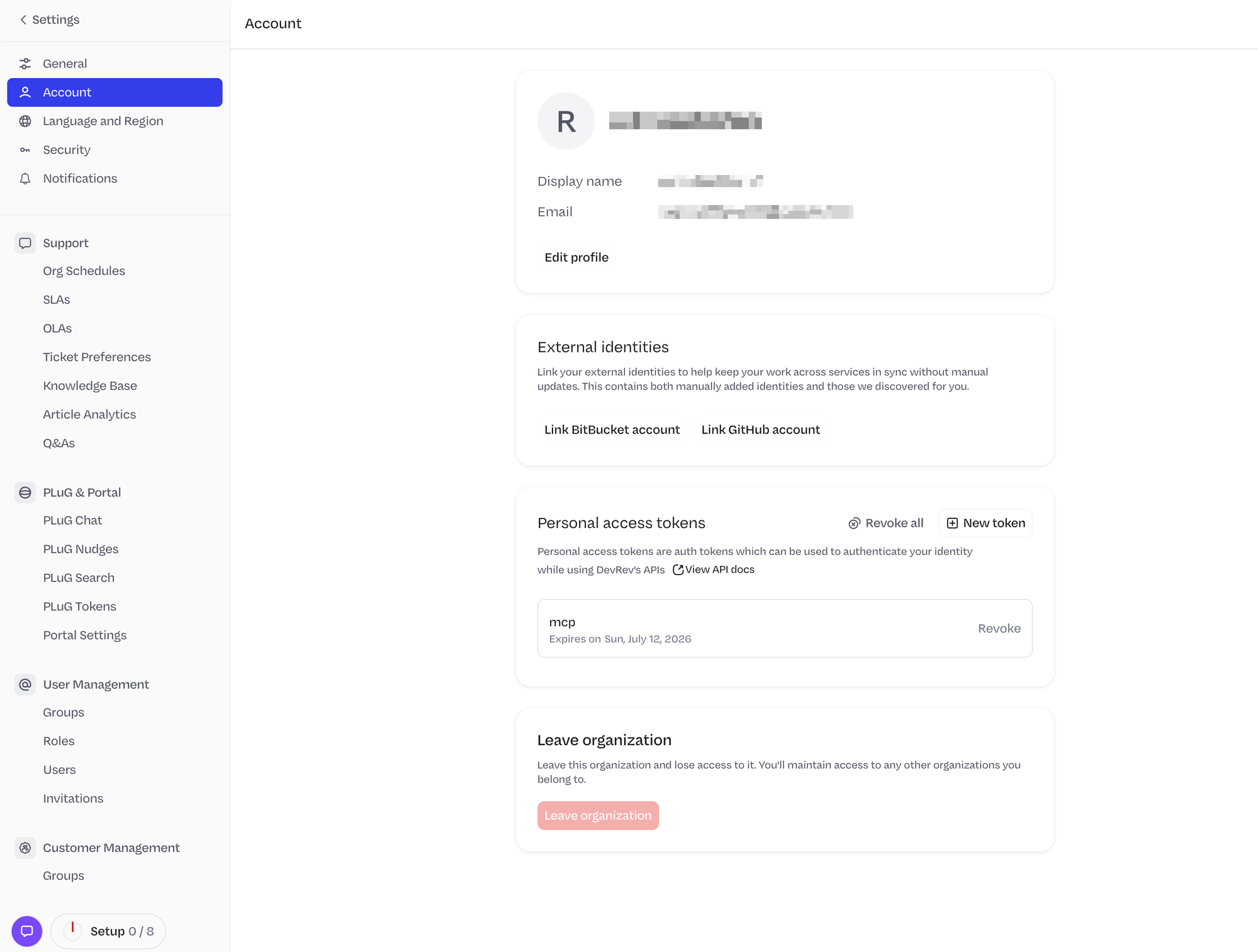
- Log in to the DevRev dashboard.
- Click the Settings icon in the top-right corner.
- In the left sidebar, select Account.
- Scroll down to the Personal access tokens section and click New token.
- Enter a name (e.g.
mcp), set an expiry date, and click Create. - Copy the token — it is shown only once.
-
Create a connection in Scalekit
- In the Scalekit dashboard, go to AgentKit → Connections → Create Connection.
- Search for DevRev MCP and click Create.
- Paste your Personal Access Token into the Token field.
- Click Save and note the Connection name — use this as
connection_namein your code.
-
-
Make your first call
Section titled “Make your first call”quickstart.ts import { ScalekitClient } from '@scalekit-sdk/node'import 'dotenv/config'const scalekit = new ScalekitClient(process.env.SCALEKIT_ENV_URL,process.env.SCALEKIT_CLIENT_ID,process.env.SCALEKIT_CLIENT_SECRET,)const actions = scalekit.actionsconst connector = 'devrevmcp'const identifier = 'user_123'// Make your first callconst result = await actions.executeTool({connector,identifier,toolName: 'devrevmcp_get_self',toolInput: {},})console.log(result)quickstart.py import osfrom scalekit.client import ScalekitClientfrom dotenv import load_dotenvload_dotenv()scalekit_client = ScalekitClient(env_url=os.getenv("SCALEKIT_ENV_URL"),client_id=os.getenv("SCALEKIT_CLIENT_ID"),client_secret=os.getenv("SCALEKIT_CLIENT_SECRET"),)actions = scalekit_client.actionsconnection_name = "devrevmcp"identifier = "user_123"# Make your first callresult = actions.execute_tool(tool_input={},tool_name="devrevmcp_get_self",connection_name=connection_name,identifier=identifier,)print(result)
What you can do
Section titled “What you can do”Connect this agent connector to let your agent:
- Update object — Update fields on an existing DevRev object using a specified update action
- List objects — List DevRev objects (issues, tickets, etc.) with optional filters using a specified list action
- Objects link — Create a link between two DevRev objects using a specified link action
- Search hybrid — Search across DevRev’s knowledge graph using natural language to find issues, tickets, articles, and other objects
- Get valid stage transitions, tool metadata, sprint board — Return valid stage transitions for a given DevRev object type and its current stage
- Fetch object context — Fetch contextual information about any DevRev object by its DON ID or display ID
Tool list
Section titled “Tool list”Use the exact tool names from the Tool list below when you call execute_tool. If you’re not sure which name to use, list the tools available for the current user first.
devrevmcp_add_comment#Add a comment to any DevRev object, with support for markdown formatting and user mentions.4 params
Add a comment to any DevRev object, with support for markdown formatting and user mentions.
objectstringrequiredDON ID of the DevRev object to comment on.bodystringoptionalThe markdown-formatted body of the comment.snap_kit_bodystringoptionalOptional snap-kit UI component to render with the comment. Accepts a static snap-kit component as a valid JSON object.visibilitystringoptionalVisibility of the comment: external (default), internal (dev org only), or private (specified users only).devrevmcp_create_object#Create a new DevRev object (issue, ticket, etc.) by specifying an action name and field values.3 params
Create a new DevRev object (issue, ticket, etc.) by specifying an action name and field values.
action_namestringrequiredThe create action identifier (e.g., create_issue, create_ticket). Must be one of the create actions returned by discover_schema.valuesobjectrequiredKey-value pairs of field names and values for the new object. Call discover_schema first to get required and optional fields.subtypestringoptionalThe subtype of the object to create (e.g., issue, ticket). Omit to create the stock type.devrevmcp_discover_schema#Retrieve the input schema for a DevRev action, or list all available actions.2 params
Retrieve the input schema for a DevRev action, or list all available actions.
action_namestringoptionalThe action name to retrieve the schema for (e.g., create_issue). Omit to list all available actions.subtypestringoptionalThe subtype to get the schema for. Omit to retrieve the schema for the stock type.devrevmcp_fetch_object_context#Fetch contextual information about any DevRev object by its DON ID or display ID.1 param
Fetch contextual information about any DevRev object by its DON ID or display ID.
object_idstringrequiredThe DON ID or display ID of the DevRev object to fetch context for.devrevmcp_get_self#Retrieve the profile details of the currently authenticated DevRev user.0 params
Retrieve the profile details of the currently authenticated DevRev user.
devrevmcp_get_sprint#Retrieve the details of a specific DevRev sprint by its DON ID.1 param
Retrieve the details of a specific DevRev sprint by its DON ID.
idstringrequiredThe DON ID of the sprint to retrieve.devrevmcp_get_sprint_board#Retrieve the details of a specific DevRev sprint board (vista) by its DON ID.1 param
Retrieve the details of a specific DevRev sprint board (vista) by its DON ID.
idstringrequiredThe DON ID of the sprint board (vista) to retrieve.devrevmcp_get_tool_metadata#Retrieve comprehensive metadata about available DevRev MCP tools. Call this first before any other operation.0 params
Retrieve comprehensive metadata about available DevRev MCP tools. Call this first before any other operation.
devrevmcp_get_valid_stage_transitions#Return valid stage transitions for a given DevRev object type and its current stage.2 params
Return valid stage transitions for a given DevRev object type and its current stage.
object_typestringrequiredThe stock leaf type of the object.stage_idstringrequiredThe DON ID of the current stage of the object.devrevmcp_hybrid_search#Search across DevRev's knowledge graph using natural language to find issues, tickets, articles, and other objects.8 params
Search across DevRev's knowledge graph using natural language to find issues, tickets, articles, and other objects.
namespacestringrequiredPrimary namespace to search in.querystringrequiredA natural language question to search across DevRev's knowledge graph.reranking_instructionstringrequiredA single sentence (≤15 words) guiding document ranking based on the query.allowed_namespacesarrayoptionalNamespaces to restrict the search to. Leave empty to search all namespaces.idsarrayoptionalDON IDs to filter search results by.include_commentsbooleanoptionalWhether to include object comments in results. When true, results are limited to 10 objects.limitnumberoptionalMaximum number of results to return.projection_typestringoptionalShape of each returned object: id, id_with_label, or summary.devrevmcp_link_objects#Create a link between two DevRev objects using a specified link action.4 params
Create a link between two DevRev objects using a specified link action.
action_namestringrequiredThe link action identifier (e.g., link_ticket_with_issue). Must be one of the link actions returned by discover_schema.sourcestringrequiredThe display ID of the source object to link from (e.g., ISS-123, TKT-123).targetstringrequiredThe display ID of the target object to link to (e.g., TKT-456, ISS-456).link_typestringoptionalType of link defining the relationship between the two objects.devrevmcp_list_objects#List DevRev objects (issues, tickets, etc.) with optional filters using a specified list action.3 params
List DevRev objects (issues, tickets, etc.) with optional filters using a specified list action.
action_namestringrequiredThe list action identifier (e.g., list_issues, list_tickets). Must be one of the list actions returned by discover_schema.fieldsarrayoptionalField names to include in each returned object. Omit to return all fields.valuesobjectoptionalFilter parameters to narrow results. Call discover_schema first to get available filter fields.devrevmcp_update_object#Update fields on an existing DevRev object using a specified update action.3 params
Update fields on an existing DevRev object using a specified update action.
action_namestringrequiredThe update action identifier (e.g., update_issue, update_ticket). Must be one of the update actions returned by discover_schema.valuesobjectrequiredFields to update including the object ID. Use discover_schema for allowed fields.subtypestringoptionalThe subtype of the object to update. Omit to update the stock type.