


PhantomBuster connector
API KeyAIAutomationConnect to PhantomBuster to automate web scraping and data extraction workflows. Launch, monitor, and manage automation agents that extract data from...
PhantomBuster connector
-
Install the SDK
Section titled “Install the SDK”Terminal window npm install @scalekit-sdk/nodeTerminal window pip install scalekit -
Set your credentials
Section titled “Set your credentials”Add your Scalekit credentials to your
.envfile. Find values in app.scalekit.com > Developers > API Credentials..env SCALEKIT_ENVIRONMENT_URL=<your-environment-url>SCALEKIT_CLIENT_ID=<your-client-id>SCALEKIT_CLIENT_SECRET=<your-client-secret> -
Set up the connector
Section titled “Set up the connector”Register your PhantomBuster credentials with Scalekit so it can authenticate requests on your behalf. You do this once per environment.
Dashboard setup steps
Register your PhantomBuster API key with Scalekit so it can authenticate and proxy automation requests on behalf of your users. PhantomBuster uses API key authentication — there is no redirect URI or OAuth flow.
-
Get your PhantomBuster API key
-
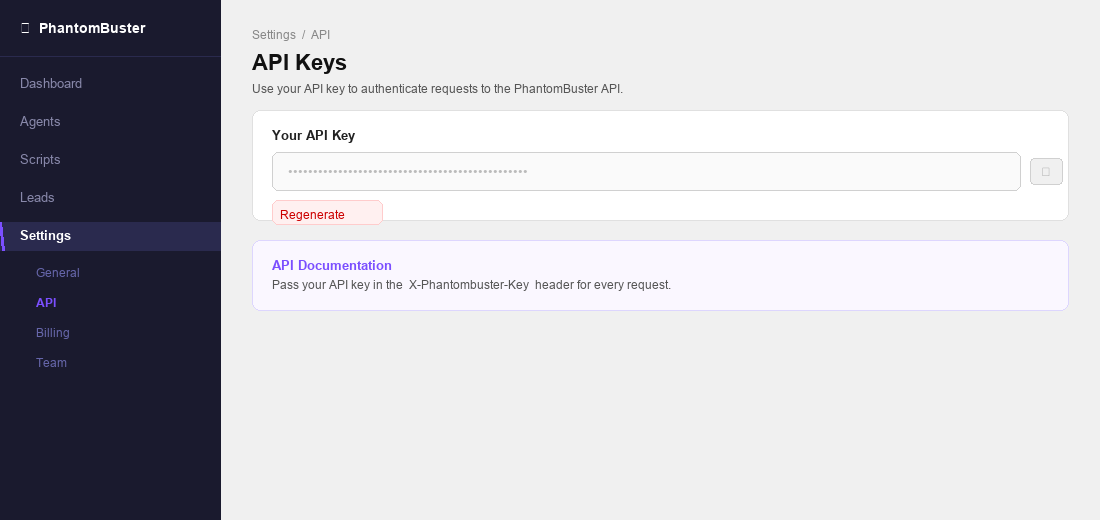
Sign in to phantombuster.com and go to Settings → API in the left sidebar.
-
Your API key is displayed on this page. Click the copy icon to copy it. If you need a new key, click Regenerate.
-
-
Create a connection in Scalekit
-
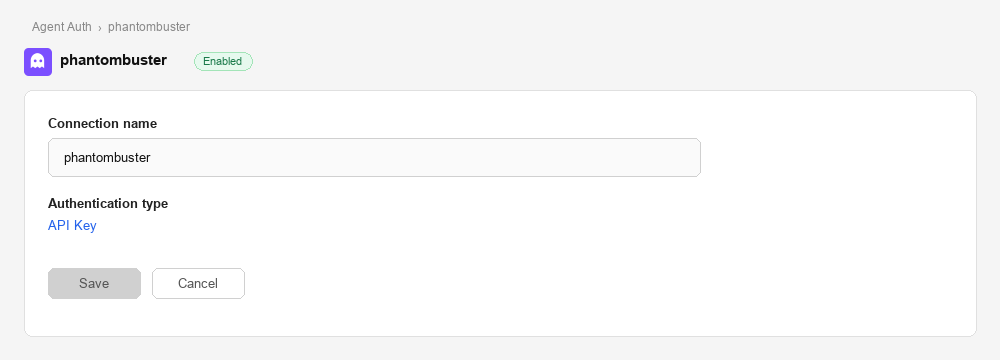
In Scalekit dashboard, go to AgentKit > Connections > Create Connection. Find PhantomBuster and click Create.
-
Note the Connection name — you will use this as
connection_namein your code (e.g.,phantombuster).
-
-
Add a connected account
Connected accounts link a specific user identifier in your system to a PhantomBuster API key. Add accounts via the dashboard for testing, or via the Scalekit API in production.
Via dashboard (for testing)
-
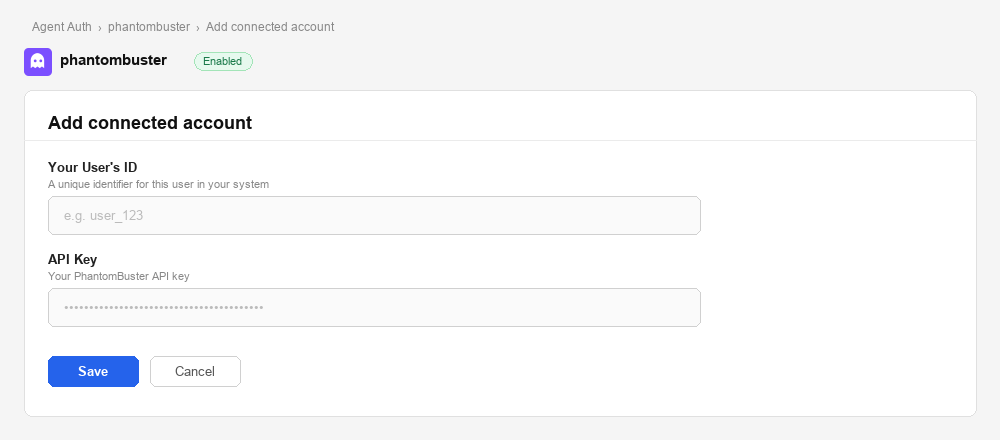
Open the connection you created and click the Connected Accounts tab → Add account.
-
Fill in:
- Your User’s ID — a unique identifier for this user in your system (e.g.,
user_123) - API Key — the PhantomBuster API key you copied in step 1
- Your User’s ID — a unique identifier for this user in your system (e.g.,
-
Click Save.
Via API (for production)
await scalekit.actions.upsertConnectedAccount({connectionName: 'phantombuster',identifier: 'user_123',credentials: { api_key: 'your-phantombuster-api-key' },});scalekit_client.actions.upsert_connected_account(connection_name="phantombuster",identifier="user_123",credentials={"api_key": "your-phantombuster-api-key"}) -
-
-
Make your first call
Section titled “Make your first call”quickstart.ts import { ScalekitClient } from '@scalekit-sdk/node'import 'dotenv/config'const scalekit = new ScalekitClient(process.env.SCALEKIT_ENV_URL,process.env.SCALEKIT_CLIENT_ID,process.env.SCALEKIT_CLIENT_SECRET,)const actions = scalekit.actionsconst connector = 'phantombuster'const identifier = 'user_123'// Make your first callconst result = await actions.executeTool({connector,identifier,toolName: 'phantombuster_org_fetch',toolInput: {},})console.log(result)quickstart.py import osfrom scalekit.client import ScalekitClientfrom dotenv import load_dotenvload_dotenv()scalekit_client = ScalekitClient(env_url=os.getenv("SCALEKIT_ENV_URL"),client_id=os.getenv("SCALEKIT_CLIENT_ID"),client_secret=os.getenv("SCALEKIT_CLIENT_SECRET"),)actions = scalekit_client.actionsconnection_name = "phantombuster"identifier = "user_123"# Make your first callresult = actions.execute_tool(tool_input={},tool_name="phantombuster_org_fetch",connection_name=connection_name,identifier=identifier,)print(result)
What you can do
Section titled “What you can do”Connect this agent connector to let your agent:
- Attach container — Attach to a running PhantomBuster container and stream its console output in real-time
- Launch agent — Launch a PhantomBuster automation agent asynchronously
- Fetch agent, org, lists — Get the output of the most recent container of an agent
- Completions ai — Get an AI text completion from PhantomBuster’s AI service
- Release branch — Release (promote to production) specified scripts on a branch in the current PhantomBuster organization
- Stop agent — Stop a currently running PhantomBuster agent execution
Common workflows
Section titled “Common workflows”Proxy API call
// List all agents via Scalekit proxy — no API key needed hereconst result = await actions.request({ connectionName: 'phantombuster', identifier: 'user_123', path: '/api/v2/agents', method: 'GET',});console.log(result.data);# List all agents via Scalekit proxy — no API key needed hereresult = actions.request( connection_name='phantombuster', identifier='user_123', path="/api/v2/agents", method="GET")print(result)Launch an agent and retrieve results
The most common PhantomBuster workflow: launch an automation agent, stream its console output while it runs, then read the final result.
# Step 1: Find the agent you want to runagents = actions.execute_tool( connection_name='phantombuster', identifier='user_123', tool_name="phantombuster_agents_fetch_all", tool_input={})agent_id = agents.result[0]["id"] # pick the first agent, or filter by name
# Step 2: Launch the agentlaunch_result = actions.execute_tool( connection_name='phantombuster', identifier='user_123', tool_name="phantombuster_agent_launch", tool_input={ "id": agent_id, "output": "result-object", })container_id = launch_result.result["containerId"]print(f"Agent launched. Container ID: {container_id}")
# Step 3: Poll for output until the agent finishesoutput_pos = 0while True: output = actions.execute_tool( connection_name='phantombuster', identifier='user_123', tool_name="phantombuster_container_fetch_output", tool_input={"id": container_id, "fromOutputPos": output_pos} ) print(output.result.get("output", ""), end="", flush=True) output_pos = output.result.get("nextOutputPos", output_pos) if output.result.get("status") in ("finished", "error"): break time.sleep(3) # poll every 3 seconds
# Step 4: Fetch the structured resultfinal_result = actions.execute_tool( connection_name='phantombuster', identifier='user_123', tool_name="phantombuster_container_fetch_result", tool_input={"id": container_id})print("Scraped profiles:", final_result.result)Save scraped profiles as leads
After a scraping run, bulk-save extracted profiles to a PhantomBuster lead list for downstream CRM enrichment or outreach.
# First: fetch available lead lists (or create one in the PhantomBuster dashboard)lists = actions.execute_tool( connection_name='phantombuster', identifier='user_123', tool_name="phantombuster_lists_fetch_all", tool_input={})list_id = lists.result[0]["id"] # use the first list, or filter by name
# Bulk-save up to 1,000 profiles in one call — more efficient than loopingactions.execute_tool( connection_name='phantombuster', identifier='user_123', tool_name="phantombuster_leads_save_many", tool_input={ "listId": list_id, "leads": [ { "firstName": p.get("firstName"), "lastName": p.get("lastName"), "email": p.get("email"), "linkedinUrl": p.get("linkedinUrl"), "company": p.get("company"), "jobTitle": p.get("title"), "additionalFields": { "source": "phantombuster-scraper", "agentId": agent_id, "containerId": container_id, }, } for p in final_result.result ], })print(f"{len(final_result.result)} leads saved to list {list_id}.")Check resource usage before running agents
Avoid quota errors by verifying execution time and credit balances before launching a large scraping run.
resources = actions.execute_tool( connection_name='phantombuster', identifier='user_123', tool_name="phantombuster_org_fetch_resources", tool_input={})
exec_time = resources.result.get("executionTime", {})ai_credits = resources.result.get("aiCredits", {})
if exec_time.get("remaining", 0) < 30: raise RuntimeError( f"Insufficient execution time: {exec_time.get('remaining')} min remaining. " "Upgrade at phantombuster.com/pricing or wait for your plan to reset." )
print(f"Execution time: {exec_time['remaining']} min remaining ({exec_time.get('used')} used)")print(f"AI credits: {ai_credits.get('remaining', 'N/A')}")Run AI completions on scraped data
Use PhantomBuster’s AI service to extract structured data from raw agent output — such as parsing job titles into seniority levels or extracting skills from profile summaries.
# Extract structured data from a raw LinkedIn profile headlinecompletion = actions.execute_tool( connection_name='phantombuster', identifier='user_123', tool_name="phantombuster_ai_completions", tool_input={ "model": "gpt-4o", "messages": [ { "role": "system", "content": "Extract the seniority level and primary skill from this LinkedIn headline. Return JSON only.", }, { "role": "user", "content": "Senior Software Engineer at Acme Corp | React, TypeScript, GraphQL", }, ], "responseSchema": { "type": "object", "properties": { "seniority": {"type": "string", "enum": ["junior", "mid", "senior", "lead", "exec"]}, "primarySkill": {"type": "string"}, }, "required": ["seniority", "primarySkill"], }, })print("Parsed profile:", completion.result)# → {'seniority': 'senior', 'primarySkill': 'React'}LangChain integration
Let an LLM decide which PhantomBuster tool to call based on natural language. This example builds an agent that can manage automation runs and leads in response to user input.
from langchain_openai import ChatOpenAIfrom langchain.agents import AgentExecutor, create_openai_tools_agentfrom langchain_core.prompts import ( ChatPromptTemplate, SystemMessagePromptTemplate, HumanMessagePromptTemplate, MessagesPlaceholder, PromptTemplate)
# Load all PhantomBuster tools in LangChain format. Use page_size=100 so connector tool lists are not truncated.tools = actions.langchain.get_tools( identifier='user_123', providers=["PHANTOMBUSTER"], page_size=100)
prompt = ChatPromptTemplate.from_messages([ SystemMessagePromptTemplate(prompt=PromptTemplate( input_variables=[], template=( "You are a PhantomBuster automation assistant. " "Use the available tools to manage agents, check resource usage, " "manage leads, and analyse automation run results." ) )), MessagesPlaceholder(variable_name="chat_history", optional=True), HumanMessagePromptTemplate(prompt=PromptTemplate( input_variables=["input"], template="{input}" )), MessagesPlaceholder(variable_name="agent_scratchpad")])
llm = ChatOpenAI(model="gpt-4o")agent = create_openai_tools_agent(llm, tools, prompt)agent_executor = AgentExecutor(agent=agent, tools=tools, verbose=True)
result = agent_executor.invoke({ "input": "List all my agents, show which ones ran in the last 24 hours, and tell me how many leads are in each list"})print(result["output"])Tool list
Section titled “Tool list”Use the exact tool names from the Tool list below when you call execute_tool. If you’re not sure which name to use, list the tools available for the current user first.
phantombuster_agent_delete#Permanently delete a PhantomBuster agent and all its associated data. This action is irreversible.1 param
Permanently delete a PhantomBuster agent and all its associated data. This action is irreversible.
agentIdstringrequiredThe unique identifier of the agent to permanently delete.phantombuster_agent_fetch#Retrieve details of a specific PhantomBuster agent by its ID. Returns agent name, script, schedule, launch type, argument configuration, and current status.1 param
Retrieve details of a specific PhantomBuster agent by its ID. Returns agent name, script, schedule, launch type, argument configuration, and current status.
agentIdstringrequiredThe unique identifier of the agent to retrieve.phantombuster_agent_fetch_output#Get the output of the most recent container of an agent. Designed for incremental data retrieval — use fromOutputPos to fetch only new output since the last call.5 params
Get the output of the most recent container of an agent. Designed for incremental data retrieval — use fromOutputPos to fetch only new output since the last call.
idstringrequiredID of the agent to fetch output from.fromOutputPosnumberoptionalStart output from this byte position (for incremental fetching).prevContainerIdstringoptionalRetrieve output from the container after this previous container ID.prevRuntimeEventIndexnumberoptionalReturn runtime events starting from this index.prevStatusstringoptionalPreviously retrieved status from user-side (for delta detection).phantombuster_agent_launch#Launch a PhantomBuster automation agent asynchronously. Starts the agent execution immediately and returns a container ID to track progress. Use the Get Container Output or Get Container Result tools to retrieve results.4 params
Launch a PhantomBuster automation agent asynchronously. Starts the agent execution immediately and returns a container ID to track progress. Use the Get Container Output or Get Container Result tools to retrieve results.
agentIdstringrequiredThe unique identifier of the agent to launch.argumentsobjectoptionalJSON object of input arguments to pass to the agent for this execution.outputstringoptionalOutput mode for the launch response.saveArgumentsbooleanoptionalWhether to persist the provided arguments as the agent's default arguments for future launches.phantombuster_agent_launch_soon#Schedule a PhantomBuster agent to launch within a specified number of minutes. Useful for delayed execution without setting up a full recurring schedule.4 params
Schedule a PhantomBuster agent to launch within a specified number of minutes. Useful for delayed execution without setting up a full recurring schedule.
idstringrequiredID of the agent to schedule.minutesintegerrequiredNumber of minutes from now after which the agent will launch.argumentobjectoptionalInput arguments to pass to the agent for this execution (object or JSON string).saveArgumentbooleanoptionalIf true, saves the provided argument as the agent's default for future launches.phantombuster_agent_save#Create a new PhantomBuster agent or update an existing one. Supports configuring the script, schedule, proxy, notifications, execution limits, and launch arguments. Pass an ID to update; omit to create.13 params
Create a new PhantomBuster agent or update an existing one. Supports configuring the script, schedule, proxy, notifications, execution limits, and launch arguments. Pass an ID to update; omit to create.
argumentobjectoptionalDefault launch argument for the agent (object or JSON string).branchstringoptionalScript branch to use (e.g., main, staging).executionTimeLimitnumberoptionalMaximum execution time in seconds before the agent is killed.idstringoptionalID of the agent to update. Omit to create a new agent.launchTypestringoptionalHow the agent is launched.maxParallelismnumberoptionalMaximum number of concurrent executions allowed for this agent.maxRetryNumbernumberoptionalMaximum number of retries before aborting on failure.namestringoptionalDisplay name for the agent.proxyAddressstringoptionalHTTP proxy address or proxy pool name.proxyPasswordstringoptionalProxy authentication password.proxyTypestringoptionalProxy configuration type.proxyUsernamestringoptionalProxy authentication username.scriptstringoptionalScript slug or name to assign to this agent.phantombuster_agent_stop#Stop a currently running PhantomBuster agent execution. Gracefully halts the agent and saves any partial results collected up to that point.1 param
Stop a currently running PhantomBuster agent execution. Gracefully halts the agent and saves any partial results collected up to that point.
agentIdstringrequiredThe unique identifier of the agent to stop.phantombuster_agents_fetch_all#Retrieve all automation agents in the PhantomBuster organization. Returns agent IDs, names, associated scripts, schedules, and current status.0 params
Retrieve all automation agents in the PhantomBuster organization. Returns agent IDs, names, associated scripts, schedules, and current status.
phantombuster_agents_fetch_deleted#Retrieve all deleted agents in the PhantomBuster organization. Returns agent IDs, names, creation timestamps, deletion timestamps, and who deleted each agent.0 params
Retrieve all deleted agents in the PhantomBuster organization. Returns agent IDs, names, creation timestamps, deletion timestamps, and who deleted each agent.
phantombuster_agents_unschedule_all#Disable automatic launch for ALL agents in the current PhantomBuster organization. Agents will remain but will only run when launched manually.0 params
Disable automatic launch for ALL agents in the current PhantomBuster organization. Agents will remain but will only run when launched manually.
phantombuster_ai_completions#Get an AI text completion from PhantomBuster's AI service. Supports multiple models including GPT-4o and GPT-4.1-mini. Optionally request structured JSON output via a response schema.3 params
Get an AI text completion from PhantomBuster's AI service. Supports multiple models including GPT-4o and GPT-4.1-mini. Optionally request structured JSON output via a response schema.
messagesarrayrequiredArray of conversation messages. Each must have a role (system, assistant, or user) and content string.modelstringoptionalAI model to use for the completion.temperaturenumberoptionalSampling temperature (0–2). Lower = more deterministic, higher = more creative.phantombuster_branch_create#Create a new script branch in the current PhantomBuster organization.1 param
Create a new script branch in the current PhantomBuster organization.
namestringrequiredName for the new branch. Only letters, numbers, underscores, and hyphens allowed. Max 50 characters.phantombuster_branch_delete#Permanently delete a branch by ID from the current PhantomBuster organization.1 param
Permanently delete a branch by ID from the current PhantomBuster organization.
idstringrequiredID of the branch to delete.phantombuster_branch_release#Release (promote to production) specified scripts on a branch in the current PhantomBuster organization.2 params
Release (promote to production) specified scripts on a branch in the current PhantomBuster organization.
namestringrequiredName of the branch to release.scriptIdsarrayrequiredArray of script IDs to release on this branch.phantombuster_branches_fetch_all#Retrieve all branches associated with the current PhantomBuster organization.0 params
Retrieve all branches associated with the current PhantomBuster organization.
phantombuster_container_attach#Attach to a running PhantomBuster container and stream its console output in real-time. Returns a live stream of log lines as the agent executes.1 param
Attach to a running PhantomBuster container and stream its console output in real-time. Returns a live stream of log lines as the agent executes.
idstringrequiredID of the running container to attach to.phantombuster_container_fetch#Retrieve a single PhantomBuster container by its ID. Returns status, timestamps, launch type, exit code, and optionally the full output, result object, and runtime events.5 params
Retrieve a single PhantomBuster container by its ID. Returns status, timestamps, launch type, exit code, and optionally the full output, result object, and runtime events.
idstringrequiredID of the container to fetch.withNewerAndOlderContainerIdbooleanoptionalSet to true to include the IDs of the next and previous containers for this agent.withOutputbooleanoptionalSet to true to include the container's console output.withResultObjectbooleanoptionalSet to true to include the container's result object.withRuntimeEventsbooleanoptionalSet to true to include runtime events (progress, notifications, etc.).phantombuster_container_fetch_output#Retrieve the console output and execution logs of a specific PhantomBuster container (agent run). Useful for monitoring execution progress, debugging errors, and viewing step-by-step agent activity.1 param
Retrieve the console output and execution logs of a specific PhantomBuster container (agent run). Useful for monitoring execution progress, debugging errors, and viewing step-by-step agent activity.
containerIdstringrequiredThe unique identifier of the container whose output to retrieve.phantombuster_container_fetch_result#Retrieve the final result object of a completed PhantomBuster container (agent run). Returns the structured data extracted or produced by the agent, such as scraped profiles, leads, or exported records.1 param
Retrieve the final result object of a completed PhantomBuster container (agent run). Returns the structured data extracted or produced by the agent, such as scraped profiles, leads, or exported records.
containerIdstringrequiredThe unique identifier of the container whose result to retrieve.phantombuster_containers_fetch_all#Retrieve all execution containers (past runs) for a specific PhantomBuster agent. Returns container IDs, status, launch type, exit codes, timestamps, and runtime events for each execution.1 param
Retrieve all execution containers (past runs) for a specific PhantomBuster agent. Returns container IDs, status, launch type, exit codes, timestamps, and runtime events for each execution.
agentIdstringrequiredThe unique identifier of the agent whose containers to retrieve.phantombuster_leads_delete_many#Permanently delete multiple leads from PhantomBuster organization storage by their IDs.1 param
Permanently delete multiple leads from PhantomBuster organization storage by their IDs.
idsarrayrequiredArray of lead IDs to delete.phantombuster_leads_fetch_by_list#Fetch paginated leads belonging to a specific lead list in PhantomBuster organization storage.5 params
Fetch paginated leads belonging to a specific lead list in PhantomBuster organization storage.
listIdstringrequiredID of the lead list to fetch leads from.includeTotalCountbooleanoptionalInclude the total count of leads in the response.paginationOffsetintegeroptionalOffset for pagination.paginationOrderstringoptionalSort order for pagination.paginationSizeintegeroptionalNumber of leads per page.phantombuster_leads_save#Save a single lead to PhantomBuster organization storage.1 param
Save a single lead to PhantomBuster organization storage.
leadobjectrequiredLead data object to save.phantombuster_leads_save_many#Save multiple leads at once to PhantomBuster organization storage.1 param
Save multiple leads at once to PhantomBuster organization storage.
leadsarrayrequiredArray of lead objects to save.phantombuster_list_delete#Permanently delete a lead list from PhantomBuster organization storage by its ID.1 param
Permanently delete a lead list from PhantomBuster organization storage by its ID.
idstringrequiredID of the lead list to delete.phantombuster_list_fetch#Retrieve a specific lead list from PhantomBuster organization storage by its ID.1 param
Retrieve a specific lead list from PhantomBuster organization storage by its ID.
idstringrequiredID of the lead list to fetch.phantombuster_lists_fetch_all#Retrieve all lead lists in the PhantomBuster organization's storage.0 params
Retrieve all lead lists in the PhantomBuster organization's storage.
phantombuster_location_ip#Retrieve the country associated with an IPv4 or IPv6 address using PhantomBuster's geolocation service.1 param
Retrieve the country associated with an IPv4 or IPv6 address using PhantomBuster's geolocation service.
ipstringrequiredIPv4 or IPv6 address to look up.phantombuster_org_export_agent_usage#Export a CSV file containing agent usage metrics for the current PhantomBuster organization over a specified number of days (max 6 months).1 param
Export a CSV file containing agent usage metrics for the current PhantomBuster organization over a specified number of days (max 6 months).
daysstringrequiredNumber of days of usage data to export. Maximum is ~180 days (6 months).phantombuster_org_export_container_usage#Export a CSV file containing container usage metrics for the current PhantomBuster organization. Optionally filter to a specific agent.2 params
Export a CSV file containing container usage metrics for the current PhantomBuster organization. Optionally filter to a specific agent.
daysstringrequiredNumber of days of usage data to export. Maximum is ~180 days (6 months).agentIdstringoptionalFilter the export to a specific agent ID.phantombuster_org_fetch#Retrieve details of the current PhantomBuster organization including plan, billing, timezone, proxy config, and CRM integrations.4 params
Retrieve details of the current PhantomBuster organization including plan, billing, timezone, proxy config, and CRM integrations.
withCrmIntegrationsbooleanoptionalInclude the organization's CRM integrations.withCustomPromptsbooleanoptionalInclude the organization's custom prompts.withGlobalObjectbooleanoptionalInclude the organization's global object in the response.withProxiesbooleanoptionalInclude the organization's proxy pool configuration.phantombuster_org_fetch_agent_groups#Retrieve the agent groups and their ordering for the current PhantomBuster organization.0 params
Retrieve the agent groups and their ordering for the current PhantomBuster organization.
phantombuster_org_fetch_resources#Retrieve the current PhantomBuster organization's resource usage and limits. Returns daily and monthly usage for execution time, mail, captcha, AI credits, SERP credits, storage, and agent count.0 params
Retrieve the current PhantomBuster organization's resource usage and limits. Returns daily and monthly usage for execution time, mail, captcha, AI credits, SERP credits, storage, and agent count.
phantombuster_org_fetch_running_containers#List all currently executing containers across the PhantomBuster organization. Returns container IDs, associated agent IDs/names, creation timestamps, launch types, and script slugs.0 params
List all currently executing containers across the PhantomBuster organization. Returns container IDs, associated agent IDs/names, creation timestamps, launch types, and script slugs.
phantombuster_org_save_agent_groups#Update the agent groups and their ordering for the current PhantomBuster organization. The order of groups and agents within groups is preserved as provided.1 param
Update the agent groups and their ordering for the current PhantomBuster organization. The order of groups and agents within groups is preserved as provided.
agentGroupsarrayrequiredArray of agent groups. Each item is either an agent ID string or an object with id, name, and agents array.phantombuster_org_save_crm_contact#Save a new contact to the organization's connected CRM (HubSpot). Requires a CRM integration to be configured in the PhantomBuster organization settings.8 params
Save a new contact to the organization's connected CRM (HubSpot). Requires a CRM integration to be configured in the PhantomBuster organization settings.
crmNamestringrequiredThe CRM to save the contact to.firstnamestringrequiredContact's first name.lastnamestringrequiredContact's last name.pb_linkedin_profile_urlstringrequiredLinkedIn profile URL of the contact.companystringoptionalCompany the contact works at.emailstringoptionalContact's email address.jobtitlestringoptionalContact's job title.phonestringoptionalContact's phone number.phantombuster_script_fetch#Retrieve a specific PhantomBuster script by ID including its manifest, argument schema, output types, and optionally the full source code.3 params
Retrieve a specific PhantomBuster script by ID including its manifest, argument schema, output types, and optionally the full source code.
idstringrequiredID of the script to fetch.branchstringoptionalBranch of the script to fetch.withCodebooleanoptionalSet to true to include the script's source code in the response.phantombuster_scripts_fetch_all#Retrieve all scripts associated with the current PhantomBuster user. Returns script IDs, names, slugs, descriptions, branches, and manifest details.3 params
Retrieve all scripts associated with the current PhantomBuster user. Returns script IDs, names, slugs, descriptions, branches, and manifest details.
branchstringoptionalFilter scripts by branch name.excludestringoptionalExclude modules or non-modules from results.orgstringoptionalFilter scripts by organization.