


Pipedrive connector
OAuth 2.0CRM & SalesConnect to Pipedrive CRM. Manage deals, contacts, organizations, activities, leads, and notes to streamline your sales pipeline.
Pipedrive connector
-
Install the SDK
Section titled “Install the SDK”Terminal window npm install @scalekit-sdk/nodeTerminal window pip install scalekit -
Set your credentials
Section titled “Set your credentials”Add your Scalekit credentials to your
.envfile. Find values in app.scalekit.com > Developers > API Credentials..env SCALEKIT_ENVIRONMENT_URL=<your-environment-url>SCALEKIT_CLIENT_ID=<your-client-id>SCALEKIT_CLIENT_SECRET=<your-client-secret> -
Set up the connector
Section titled “Set up the connector”Register your Pipedrive credentials with Scalekit so it handles the token lifecycle. You do this once per environment.
Dashboard setup steps
Register your Scalekit environment with the Pipedrive connector so Scalekit handles the OAuth flow and token lifecycle on your behalf. The connection name you create is used to identify and invoke the connection in code.
-
Create a connection in Scalekit
-
In Scalekit dashboard, go to AgentKit > Connections > Create Connection. Find Pipedrive and click Create.
-
Click Use your own credentials and copy the Redirect URI. It looks like:
https://<SCALEKIT_ENVIRONMENT_URL>/sso/v1/oauth/<CONNECTION_ID>/callback
Keep this tab open — you’ll return to it in step 3.
-
-
Create a Pipedrive OAuth app
-
Go to the Pipedrive Developer Hub and sign in with your Pipedrive account.
-
Create a new app and fill in the form:
- App name — a name to identify your app (e.g.,
My Sales Agent) - Callback URL — paste the Redirect URI you copied from Scalekit
- App name — a name to identify your app (e.g.,
-
Under OAuth & Access Scopes, select the permissions your agent needs:
Scope Access granted deals:fullRead and write deals contacts:fullRead and write persons and organizations leads:fullRead and write leads activities:fullRead and write activities products:fullRead and write products users:readRead user information webhooks:fullManage webhooks -
Click Save.
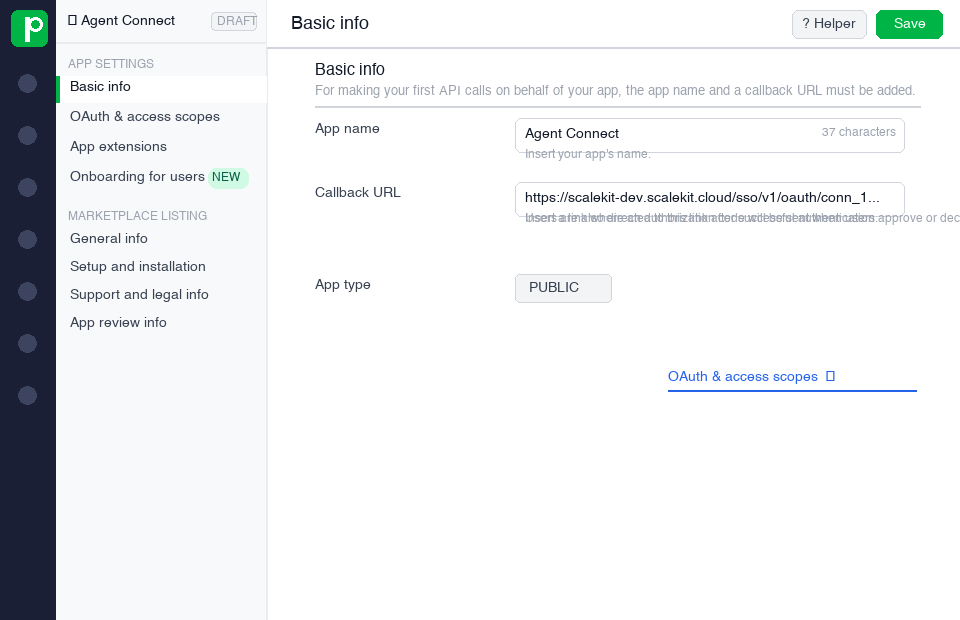
-
-
Copy your client credentials
After saving your app, Pipedrive shows the Client ID and Client Secret.
Copy both values now — you will need them in the next step.
-
Add credentials in Scalekit
-
Return to Scalekit dashboard → AgentKit > Connections and open the connection you created in step 1.
-
Enter the following:
- Client ID — from Pipedrive
- Client Secret — from Pipedrive
- Permissions — the same scopes you selected in Pipedrive
-
Click Save.
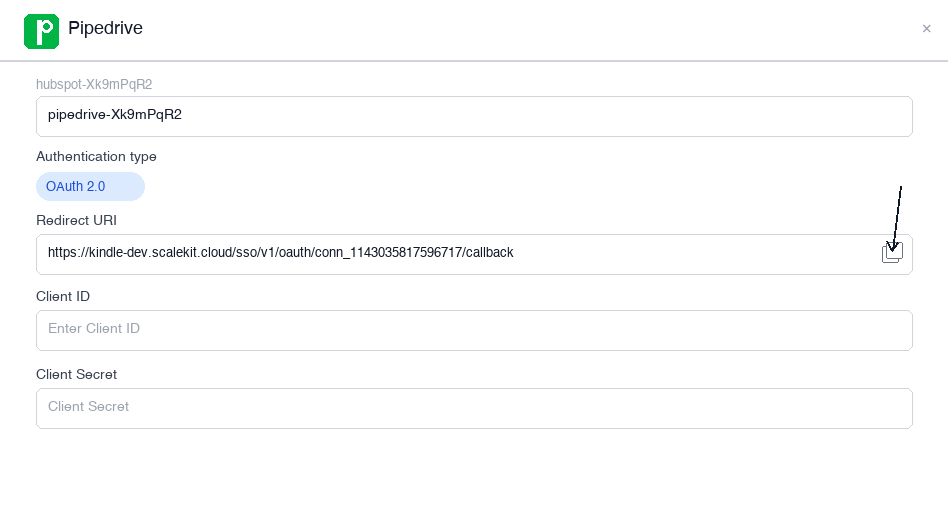
-
-
-
Authorize and make your first call
Section titled “Authorize and make your first call”quickstart.ts import { ScalekitClient } from '@scalekit-sdk/node'import 'dotenv/config'const scalekit = new ScalekitClient(process.env.SCALEKIT_ENV_URL,process.env.SCALEKIT_CLIENT_ID,process.env.SCALEKIT_CLIENT_SECRET,)const actions = scalekit.actionsconst connector = 'pipedrive'const identifier = 'user_123'// Generate an authorization link for the userconst { link } = await actions.getAuthorizationLink({ connectionName: connector, identifier })console.log('Authorize Pipedrive:', link)process.stdout.write('Press Enter after authorizing...')await new Promise(r => process.stdin.once('data', r))// Make your first callconst result = await actions.executeTool({connector,identifier,toolName: 'pipedrive_activities_list',toolInput: {},})console.log(result)quickstart.py import osfrom scalekit.client import ScalekitClientfrom dotenv import load_dotenvload_dotenv()scalekit_client = ScalekitClient(env_url=os.getenv("SCALEKIT_ENV_URL"),client_id=os.getenv("SCALEKIT_CLIENT_ID"),client_secret=os.getenv("SCALEKIT_CLIENT_SECRET"),)actions = scalekit_client.actionsconnection_name = "pipedrive"identifier = "user_123"# Generate an authorization link for the userlink_response = actions.get_authorization_link(connection_name=connection_name,identifier=identifier,)print("Authorize Pipedrive:", link_response.link)input("Press Enter after authorizing...")# Make your first callresult = actions.execute_tool(tool_input={},tool_name="pipedrive_activities_list",connection_name=connection_name,identifier=identifier,)print(result)
What you can do
Section titled “What you can do”Connect this agent connector to let your agent:
- Update product, pipeline, activity — Update an existing product in Pipedrive
- Get person, deal, lead — Retrieve details of a specific person (contact) in Pipedrive by their ID, including name, emails, phones, and associated organization
- Me user — Retrieve the profile of the currently authenticated user in Pipedrive
- Delete webhook, note, organization — Delete a webhook from Pipedrive by its ID
- List stages, leads, organizations — Retrieve all stages in Pipedrive
- Create person, product, pipeline — Create a new person (contact) in Pipedrive with name, email, phone, and optional organization association
Tool list
Section titled “Tool list”Use the exact tool names from the Tool list below when you call execute_tool. If you’re not sure which name to use, list the tools available for the current user first.
pipedrive_activities_list#Retrieve a list of activities from Pipedrive. Filter by owner, deal, person, organization, completion status, and date range.8 params
Retrieve a list of activities from Pipedrive. Filter by owner, deal, person, organization, completion status, and date range.
cursorstringoptionalCursor for pagination from a previous response.deal_idintegeroptionalFilter activities by deal ID.donebooleanoptionalFilter by completion status: true for done, false for undone.limitintegeroptionalNumber of activities to return per page (max 500).org_idintegeroptionalFilter activities by organization ID.owner_idintegeroptionalFilter activities by owner user ID.person_idintegeroptionalFilter activities by person ID.updated_sincestringoptionalFilter activities updated after this RFC3339 datetime.pipedrive_activity_create#Create a new activity in Pipedrive such as a call, meeting, email, or task. Associate it with a deal, person, or organization.9 params
Create a new activity in Pipedrive such as a call, meeting, email, or task. Associate it with a deal, person, or organization.
subjectstringrequiredSubject/title of the activity.deal_idintegeroptionalID of the deal to associate this activity with.due_datestringoptionalDue date of the activity in YYYY-MM-DD format.due_timestringoptionalDue time of the activity in HH:MM format.notestringoptionalNote or description for the activity.org_idintegeroptionalID of the organization to associate this activity with.owner_idintegeroptionalID of the user responsible for this activity.person_idintegeroptionalID of the person to associate this activity with.typestringoptionalType of activity (e.g., call, meeting, email, task, deadline, lunch).pipedrive_activity_delete#Delete an activity from Pipedrive by its ID. After 30 days it will be permanently removed.1 param
Delete an activity from Pipedrive by its ID. After 30 days it will be permanently removed.
idintegerrequiredThe ID of the activity to delete.pipedrive_activity_update#Update an existing activity in Pipedrive. Modify subject, type, due date/time, note, completion status, or associations.8 params
Update an existing activity in Pipedrive. Modify subject, type, due date/time, note, completion status, or associations.
idintegerrequiredThe ID of the activity to update.deal_idintegeroptionalID of the deal to associate this activity with.donebooleanoptionalMark the activity as done (true) or undone (false).due_datestringoptionalUpdated due date in YYYY-MM-DD format.due_timestringoptionalUpdated due time in HH:MM format.notestringoptionalUpdated note or description for the activity.subjectstringoptionalUpdated subject/title of the activity.typestringoptionalUpdated type of activity (e.g., call, meeting, email, task).pipedrive_deal_create#Create a new deal in Pipedrive with a title, value, currency, pipeline, stage, associated person and organization.9 params
Create a new deal in Pipedrive with a title, value, currency, pipeline, stage, associated person and organization.
titlestringrequiredTitle of the deal.currencystringoptionalCurrency code for the deal value (e.g., USD, EUR).expected_close_datestringoptionalExpected close date in YYYY-MM-DD format.org_idintegeroptionalID of the organization to associate with this deal.owner_idintegeroptionalID of the user who owns this deal.person_idintegeroptionalID of the person to associate with this deal.pipeline_idintegeroptionalID of the pipeline to place this deal in.stage_idintegeroptionalID of the pipeline stage for this deal.valuenumberoptionalMonetary value of the deal.pipedrive_deal_delete#Delete a deal from Pipedrive by its ID. This action marks the deal as deleted.1 param
Delete a deal from Pipedrive by its ID. This action marks the deal as deleted.
idintegerrequiredThe ID of the deal to delete.pipedrive_deal_get#Retrieve details of a specific deal in Pipedrive by its ID, including title, value, status, pipeline stage, associated person and organization.1 param
Retrieve details of a specific deal in Pipedrive by its ID, including title, value, status, pipeline stage, associated person and organization.
idintegerrequiredThe ID of the deal to retrieve.pipedrive_deal_update#Update an existing deal in Pipedrive. Modify title, value, status, pipeline stage, associated person, organization, or close date.11 params
Update an existing deal in Pipedrive. Modify title, value, status, pipeline stage, associated person, organization, or close date.
idintegerrequiredThe ID of the deal to update.currencystringoptionalCurrency code for the deal value (e.g., USD, EUR).expected_close_datestringoptionalExpected close date in YYYY-MM-DD format.org_idintegeroptionalID of the organization to associate with this deal.owner_idintegeroptionalID of the user who owns this deal.person_idintegeroptionalID of the person to associate with this deal.pipeline_idintegeroptionalID of the pipeline for this deal.stage_idintegeroptionalID of the pipeline stage for this deal.statusstringoptionalStatus of the deal: open, won, or lost.titlestringoptionalNew title for the deal.valuenumberoptionalMonetary value of the deal.pipedrive_deals_list#Retrieve a list of deals from Pipedrive. Filter by owner, person, organization, pipeline, stage, and status with cursor-based pagination.9 params
Retrieve a list of deals from Pipedrive. Filter by owner, person, organization, pipeline, stage, and status with cursor-based pagination.
cursorstringoptionalCursor for pagination from a previous response.filter_idintegeroptionalID of a saved filter to apply.limitintegeroptionalNumber of deals to return per page (max 500).org_idintegeroptionalFilter deals by organization ID.owner_idintegeroptionalFilter deals by owner user ID.person_idintegeroptionalFilter deals by person ID.pipeline_idintegeroptionalFilter deals by pipeline ID.stage_idintegeroptionalFilter deals by stage ID.statusstringoptionalFilter deals by status: open, won, lost, or all_not_deleted.pipedrive_deals_search#Search for deals in Pipedrive by a search term across title and other fields. Supports filtering by person, organization, and status.8 params
Search for deals in Pipedrive by a search term across title and other fields. Supports filtering by person, organization, and status.
termstringrequiredSearch term to find matching deals. Minimum 2 characters.cursorstringoptionalCursor for pagination from a previous response.exact_matchbooleanoptionalWhen true, only results with exact case-insensitive match are returned.fieldsstringoptionalComma-separated list of fields to search in (e.g., title,notes,custom_fields).limitintegeroptionalNumber of results per page (max 500).organization_idintegeroptionalFilter results by organization ID.person_idintegeroptionalFilter results by person ID.statusstringoptionalFilter by deal status: open, won, or lost.pipedrive_file_delete#Delete a file from Pipedrive by its ID.1 param
Delete a file from Pipedrive by its ID.
idintegerrequiredThe ID of the file to delete.pipedrive_file_get#Retrieve metadata of a specific file in Pipedrive by its ID.1 param
Retrieve metadata of a specific file in Pipedrive by its ID.
idintegerrequiredThe ID of the file to retrieve.pipedrive_files_list#Retrieve a list of files attached to Pipedrive records with pagination and sorting.3 params
Retrieve a list of files attached to Pipedrive records with pagination and sorting.
limitintegeroptionalNumber of files per page.sortstringoptionalField and direction to sort by (e.g., id DESC, add_time ASC).startintegeroptionalPagination start offset.pipedrive_goal_create#Create a new goal in Pipedrive to track team or individual performance metrics.9 params
Create a new goal in Pipedrive to track team or individual performance metrics.
assignee_idintegerrequiredID of the user or team assigned to this goal.assignee_typestringrequiredType of assignee: person or team.duration_endstringrequiredGoal end date in YYYY-MM-DD format.duration_startstringrequiredGoal start date in YYYY-MM-DD format.intervalstringrequiredGoal tracking interval: weekly, monthly, quarterly, or yearly.targetnumberrequiredTarget value for the goal.titlestringrequiredTitle of the goal.tracking_metricstringrequiredWhat to track: count or sum.type_namestringrequiredGoal type: deals_won, deals_progressed, activities_completed, activities_added, or revenue_forecast.pipedrive_goal_delete#Delete a goal from Pipedrive by its ID.1 param
Delete a goal from Pipedrive by its ID.
idstringrequiredThe ID of the goal to delete.pipedrive_goal_update#Update an existing goal in Pipedrive. Modify title, assignee, target, interval, or duration.8 params
Update an existing goal in Pipedrive. Modify title, assignee, target, interval, or duration.
idstringrequiredThe ID of the goal to update.assignee_idintegeroptionalUpdated assignee user or team ID.assignee_typestringoptionalUpdated assignee type: person or team.duration_endstringoptionalUpdated goal end date in YYYY-MM-DD format.duration_startstringoptionalUpdated goal start date in YYYY-MM-DD format.intervalstringoptionalUpdated tracking interval: weekly, monthly, quarterly, or yearly.targetnumberoptionalUpdated target value.titlestringoptionalUpdated title of the goal.pipedrive_goals_find#Search and filter goals in Pipedrive by type, title, assignee, and time period.7 params
Search and filter goals in Pipedrive by type, title, assignee, and time period.
assignee_idintegeroptionalFilter goals by assignee user or team ID.assignee_typestringoptionalType of assignee: person or team.is_activebooleanoptionalFilter by active status: true for active, false for inactive.period_endstringoptionalGoal period end date in YYYY-MM-DD format.period_startstringoptionalGoal period start date in YYYY-MM-DD format.titlestringoptionalFilter goals by title.type_namestringoptionalFilter by goal type: deals_won, deals_progressed, activities_completed, activities_added, revenue_forecast.pipedrive_lead_create#Create a new lead in Pipedrive with a title and optional associations to a person or organization.4 params
Create a new lead in Pipedrive with a title and optional associations to a person or organization.
titlestringrequiredTitle of the lead.organization_idintegeroptionalID of the organization to associate this lead with.owner_idintegeroptionalID of the user who owns this lead.person_idintegeroptionalID of the person to associate this lead with.pipedrive_lead_delete#Delete a lead from Pipedrive by its ID.1 param
Delete a lead from Pipedrive by its ID.
idstringrequiredThe UUID of the lead to delete.pipedrive_lead_get#Retrieve details of a specific lead in Pipedrive by its ID.1 param
Retrieve details of a specific lead in Pipedrive by its ID.
idstringrequiredThe UUID of the lead to retrieve.pipedrive_lead_update#Update an existing lead in Pipedrive. Modify title, owner, person, organization, or status.6 params
Update an existing lead in Pipedrive. Modify title, owner, person, organization, or status.
idstringrequiredThe UUID of the lead to update.is_archivedbooleanoptionalWhether to archive this lead.organization_idintegeroptionalID of the organization to associate this lead with.owner_idintegeroptionalID of the user who owns this lead.person_idintegeroptionalID of the person to associate this lead with.titlestringoptionalUpdated title of the lead.pipedrive_leads_list#Retrieve a list of leads from Pipedrive with pagination. Filter by owner, person, or organization.6 params
Retrieve a list of leads from Pipedrive with pagination. Filter by owner, person, or organization.
filter_idintegeroptionalID of a saved filter to apply.limitintegeroptionalNumber of leads per page.organization_idintegeroptionalFilter leads by organization ID.owner_idintegeroptionalFilter leads by owner user ID.person_idintegeroptionalFilter leads by person ID.startintegeroptionalPagination start offset.pipedrive_leads_search#Search for leads in Pipedrive by title, notes, or custom fields.7 params
Search for leads in Pipedrive by title, notes, or custom fields.
termstringrequiredSearch term. Minimum 2 characters.cursorstringoptionalCursor for pagination from a previous response.exact_matchbooleanoptionalWhen true, only exact case-insensitive matches are returned.fieldsstringoptionalComma-separated fields to search in (e.g., title,notes,custom_fields).limitintegeroptionalNumber of results per page (max 500).organization_idintegeroptionalFilter results by organization ID.person_idintegeroptionalFilter results by person ID.pipedrive_note_create#Create a new note in Pipedrive and associate it with a deal, person, organization, or lead.5 params
Create a new note in Pipedrive and associate it with a deal, person, organization, or lead.
contentstringrequiredHTML content of the note.deal_idintegeroptionalID of the deal to attach this note to.lead_idstringoptionalUUID of the lead to attach this note to.org_idintegeroptionalID of the organization to attach this note to.person_idintegeroptionalID of the person to attach this note to.pipedrive_note_delete#Delete a note from Pipedrive by its ID.1 param
Delete a note from Pipedrive by its ID.
idintegerrequiredThe ID of the note to delete.pipedrive_note_update#Update the content of an existing note in Pipedrive.2 params
Update the content of an existing note in Pipedrive.
contentstringrequiredUpdated HTML content of the note.idintegerrequiredThe ID of the note to update.pipedrive_notes_list#Retrieve a list of notes from Pipedrive. Filter by deal, person, organization, lead, or date range.7 params
Retrieve a list of notes from Pipedrive. Filter by deal, person, organization, lead, or date range.
deal_idintegeroptionalFilter notes by deal ID.lead_idstringoptionalFilter notes by lead UUID.limitintegeroptionalNumber of notes per page.org_idintegeroptionalFilter notes by organization ID.person_idintegeroptionalFilter notes by person ID.startintegeroptionalPagination start offset.user_idintegeroptionalFilter notes by the user who created them.pipedrive_organization_create#Create a new organization (company) in Pipedrive with a name, address, and optional owner.3 params
Create a new organization (company) in Pipedrive with a name, address, and optional owner.
namestringrequiredName of the organization.addressstringoptionalPhysical address of the organization.owner_idintegeroptionalID of the user who owns this organization.pipedrive_organization_delete#Delete an organization from Pipedrive by its ID.1 param
Delete an organization from Pipedrive by its ID.
idintegerrequiredThe ID of the organization to delete.pipedrive_organization_get#Retrieve details of a specific organization in Pipedrive by its ID, including name, address, and associated deals and contacts.1 param
Retrieve details of a specific organization in Pipedrive by its ID, including name, address, and associated deals and contacts.
idintegerrequiredThe ID of the organization to retrieve.pipedrive_organization_update#Update an existing organization in Pipedrive. Modify name, address, or owner.4 params
Update an existing organization in Pipedrive. Modify name, address, or owner.
idintegerrequiredThe ID of the organization to update.addressstringoptionalUpdated physical address of the organization.namestringoptionalUpdated name of the organization.owner_idintegeroptionalID of the user who owns this organization.pipedrive_organizations_list#Retrieve a list of organizations (companies) from Pipedrive with cursor-based pagination and optional filtering.4 params
Retrieve a list of organizations (companies) from Pipedrive with cursor-based pagination and optional filtering.
cursorstringoptionalCursor for pagination from a previous response.filter_idintegeroptionalID of a saved filter to apply.limitintegeroptionalNumber of organizations to return per page (max 500).owner_idintegeroptionalFilter organizations by owner user ID.pipedrive_organizations_search#Search for organizations in Pipedrive by a search term across name, address, and custom fields.5 params
Search for organizations in Pipedrive by a search term across name, address, and custom fields.
termstringrequiredSearch term. Minimum 2 characters.cursorstringoptionalCursor for pagination from a previous response.exact_matchbooleanoptionalWhen true, only exact case-insensitive matches are returned.fieldsstringoptionalComma-separated fields to search in (e.g., name,address,custom_fields).limitintegeroptionalNumber of results per page (max 500).pipedrive_person_create#Create a new person (contact) in Pipedrive with name, email, phone, and optional organization association.5 params
Create a new person (contact) in Pipedrive with name, email, phone, and optional organization association.
namestringrequiredFull name of the person.emailstringoptionalEmail address of the person.org_idintegeroptionalID of the organization to associate this person with.owner_idintegeroptionalID of the user who owns this person record.phonestringoptionalPhone number of the person.pipedrive_person_delete#Delete a person (contact) from Pipedrive by their ID.1 param
Delete a person (contact) from Pipedrive by their ID.
idintegerrequiredThe ID of the person to delete.pipedrive_person_get#Retrieve details of a specific person (contact) in Pipedrive by their ID, including name, emails, phones, and associated organization.1 param
Retrieve details of a specific person (contact) in Pipedrive by their ID, including name, emails, phones, and associated organization.
idintegerrequiredThe ID of the person to retrieve.pipedrive_person_update#Update an existing person (contact) in Pipedrive. Modify name, email, phone, organization, or owner.6 params
Update an existing person (contact) in Pipedrive. Modify name, email, phone, organization, or owner.
idintegerrequiredThe ID of the person to update.emailstringoptionalUpdated email address of the person.namestringoptionalUpdated full name of the person.org_idintegeroptionalID of the organization to associate this person with.owner_idintegeroptionalID of the user who owns this person record.phonestringoptionalUpdated phone number of the person.pipedrive_persons_list#Retrieve a list of persons (contacts) from Pipedrive. Filter by owner, organization, or deal with cursor-based pagination.6 params
Retrieve a list of persons (contacts) from Pipedrive. Filter by owner, organization, or deal with cursor-based pagination.
cursorstringoptionalCursor for pagination from a previous response.deal_idintegeroptionalFilter persons by associated deal ID.filter_idintegeroptionalID of a saved filter to apply.limitintegeroptionalNumber of persons to return per page (max 500).org_idintegeroptionalFilter persons by organization ID.owner_idintegeroptionalFilter persons by owner user ID.pipedrive_persons_search#Search for persons (contacts) in Pipedrive by name, email, phone, or custom fields.5 params
Search for persons (contacts) in Pipedrive by name, email, phone, or custom fields.
termstringrequiredSearch term to find matching persons. Minimum 2 characters.exact_matchbooleanoptionalWhen true, only results with exact case-insensitive match are returned.fieldsstringoptionalComma-separated list of fields to search in (e.g., name,email,phone,custom_fields).limitintegeroptionalNumber of results per page (max 500).organization_idintegeroptionalFilter results by organization ID.pipedrive_pipeline_create#Create a new sales pipeline in Pipedrive with a name and optional deal probability setting.2 params
Create a new sales pipeline in Pipedrive with a name and optional deal probability setting.
namestringrequiredName of the pipeline.is_deal_probability_enabledbooleanoptionalWhether deal probability is enabled for this pipeline.pipedrive_pipeline_delete#Delete a sales pipeline from Pipedrive by its ID.1 param
Delete a sales pipeline from Pipedrive by its ID.
idintegerrequiredThe ID of the pipeline to delete.pipedrive_pipeline_get#Retrieve details of a specific sales pipeline in Pipedrive by its ID.1 param
Retrieve details of a specific sales pipeline in Pipedrive by its ID.
idintegerrequiredThe ID of the pipeline to retrieve.pipedrive_pipeline_update#Update an existing sales pipeline in Pipedrive. Modify name or deal probability settings.3 params
Update an existing sales pipeline in Pipedrive. Modify name or deal probability settings.
idintegerrequiredThe ID of the pipeline to update.is_deal_probability_enabledbooleanoptionalWhether deal probability is enabled for this pipeline.namestringoptionalUpdated name of the pipeline.pipedrive_pipelines_list#Retrieve all sales pipelines from Pipedrive with their stages and configuration.4 params
Retrieve all sales pipelines from Pipedrive with their stages and configuration.
cursorstringoptionalCursor for pagination from a previous response.limitintegeroptionalNumber of pipelines per page (max 500).sort_bystringoptionalField to sort results by: id, update_time, or add_time.sort_directionstringoptionalSort direction: asc or desc.pipedrive_product_create#Create a new product in Pipedrive with name, price, description, and other attributes.6 params
Create a new product in Pipedrive with name, price, description, and other attributes.
namestringrequiredName of the product.codestringoptionalProduct code or SKU.descriptionstringoptionalDescription of the product.owner_idintegeroptionalID of the user who owns this product.taxnumberoptionalTax rate for this product (percentage).unitstringoptionalUnit of measurement for this product.pipedrive_product_delete#Delete a product from Pipedrive by its ID.1 param
Delete a product from Pipedrive by its ID.
idintegerrequiredThe ID of the product to delete.pipedrive_product_get#Retrieve details of a specific product in Pipedrive by its ID.1 param
Retrieve details of a specific product in Pipedrive by its ID.
idintegerrequiredThe ID of the product to retrieve.pipedrive_product_update#Update an existing product in Pipedrive. Modify name, code, description, unit, tax, or owner.7 params
Update an existing product in Pipedrive. Modify name, code, description, unit, tax, or owner.
idintegerrequiredThe ID of the product to update.codestringoptionalUpdated product code or SKU.descriptionstringoptionalUpdated description of the product.namestringoptionalUpdated name of the product.owner_idintegeroptionalUpdated owner user ID.taxnumberoptionalUpdated tax rate (percentage).unitstringoptionalUpdated unit of measurement.pipedrive_products_list#Retrieve a list of products from Pipedrive with cursor-based pagination and optional filtering.6 params
Retrieve a list of products from Pipedrive with cursor-based pagination and optional filtering.
cursorstringoptionalCursor for pagination from a previous response.filter_idintegeroptionalID of a saved filter to apply.limitintegeroptionalNumber of products per page (max 500).owner_idintegeroptionalFilter products by owner user ID.sort_bystringoptionalField to sort by (e.g., id, update_time, add_time, name).sort_directionstringoptionalSort direction: asc or desc.pipedrive_products_search#Search for products in Pipedrive by name, code, or custom fields.5 params
Search for products in Pipedrive by name, code, or custom fields.
termstringrequiredSearch term. Minimum 2 characters.cursorstringoptionalCursor for pagination from a previous response.exact_matchbooleanoptionalWhen true, only exact case-insensitive matches are returned.fieldsstringoptionalComma-separated fields to search in (e.g., name,code,description).limitintegeroptionalNumber of results per page (max 500).pipedrive_stage_create#Create a new stage in a Pipedrive pipeline with a name and optional deal probability settings.5 params
Create a new stage in a Pipedrive pipeline with a name and optional deal probability settings.
namestringrequiredName of the stage.pipeline_idintegerrequiredID of the pipeline this stage belongs to.days_to_rottenintegeroptionalNumber of days a deal stays in this stage before it's marked as rotten.deal_probabilityintegeroptionalDeal success probability for this stage (0-100).is_deal_rot_enabledbooleanoptionalWhether rotten flag is enabled for deals in this stage.pipedrive_stage_delete#Delete a pipeline stage from Pipedrive by its ID.1 param
Delete a pipeline stage from Pipedrive by its ID.
idintegerrequiredThe ID of the stage to delete.pipedrive_stage_get#Retrieve details of a specific pipeline stage in Pipedrive by its ID.1 param
Retrieve details of a specific pipeline stage in Pipedrive by its ID.
idintegerrequiredThe ID of the stage to retrieve.pipedrive_stage_update#Update an existing pipeline stage in Pipedrive. Modify name, pipeline, deal probability, or rotten settings.6 params
Update an existing pipeline stage in Pipedrive. Modify name, pipeline, deal probability, or rotten settings.
idintegerrequiredThe ID of the stage to update.days_to_rottenintegeroptionalNumber of days before a deal is marked as rotten.deal_probabilityintegeroptionalDeal success probability for this stage (0-100).is_deal_rot_enabledbooleanoptionalWhether rotten flag is enabled for deals in this stage.namestringoptionalUpdated name of the stage.pipeline_idintegeroptionalID of the pipeline this stage belongs to.pipedrive_stages_list#Retrieve all stages in Pipedrive. Filter by pipeline ID with cursor-based pagination.5 params
Retrieve all stages in Pipedrive. Filter by pipeline ID with cursor-based pagination.
cursorstringoptionalCursor for pagination from a previous response.limitintegeroptionalNumber of stages per page (max 500).pipeline_idintegeroptionalFilter stages by pipeline ID.sort_bystringoptionalField to sort by (e.g., id, update_time, add_time).sort_directionstringoptionalSort direction: asc or desc.pipedrive_user_get#Retrieve details of a specific user in Pipedrive by their ID.1 param
Retrieve details of a specific user in Pipedrive by their ID.
idintegerrequiredThe ID of the user to retrieve.pipedrive_user_me#Retrieve the profile of the currently authenticated user in Pipedrive.0 params
Retrieve the profile of the currently authenticated user in Pipedrive.
pipedrive_users_find#Search for Pipedrive users by name or email address.2 params
Search for Pipedrive users by name or email address.
termstringrequiredSearch term to match against user name or email.search_by_emailbooleanoptionalWhen true, the search term is matched against email addresses instead of names.pipedrive_users_list#Retrieve all users in the Pipedrive company account.0 params
Retrieve all users in the Pipedrive company account.
pipedrive_webhook_create#Create a new webhook in Pipedrive to receive real-time notifications when objects are created, updated, or deleted.7 params
Create a new webhook in Pipedrive to receive real-time notifications when objects are created, updated, or deleted.
event_actionstringrequiredAction to trigger the webhook: added, updated, deleted, or * for all.event_objectstringrequiredObject type to watch: deal, person, organization, activity, lead, note, pipeline, product, stage, user, or * for all.subscription_urlstringrequiredThe URL to send webhook notifications to.http_auth_passwordstringoptionalPassword for HTTP Basic Auth on the subscription URL.http_auth_userstringoptionalUsername for HTTP Basic Auth on the subscription URL.namestringoptionalDisplay name for this webhook.versionstringoptionalWebhook payload version: 1 or 2.pipedrive_webhook_delete#Delete a webhook from Pipedrive by its ID.1 param
Delete a webhook from Pipedrive by its ID.
idintegerrequiredThe ID of the webhook to delete.pipedrive_webhooks_list#Retrieve all webhooks configured in the Pipedrive account.0 params
Retrieve all webhooks configured in the Pipedrive account.