


Linear connector
OAuth 2.0Developer ToolsProject ManagementConnect to Linear. Manage issues, projects, sprints, and development workflows
Linear connector
-
Install the SDK
Section titled “Install the SDK”Terminal window npm install @scalekit-sdk/nodeTerminal window pip install scalekit -
Set your credentials
Section titled “Set your credentials”Add your Scalekit credentials to your
.envfile. Find values in app.scalekit.com > Developers > API Credentials..env SCALEKIT_ENVIRONMENT_URL=<your-environment-url>SCALEKIT_CLIENT_ID=<your-client-id>SCALEKIT_CLIENT_SECRET=<your-client-secret> -
Set up the connector
Section titled “Set up the connector”Register your Linear credentials with Scalekit so it handles the token lifecycle. You do this once per environment.
Dashboard setup steps
Register your Scalekit environment with the Linear connector so Scalekit handles the authentication flow and token lifecycle for you. The connection name you create will be used to identify and invoke the connection programmatically. Then complete the configuration in your application as follows:
-
Set up auth redirects
-
In Scalekit dashboard, go to AgentKit > Connections > Create Connection. Find Linear and click Create. Copy the redirect URI. It looks like
https://<SCALEKIT_ENVIRONMENT_URL>/sso/v1/oauth/<CONNECTION_ID>/callback.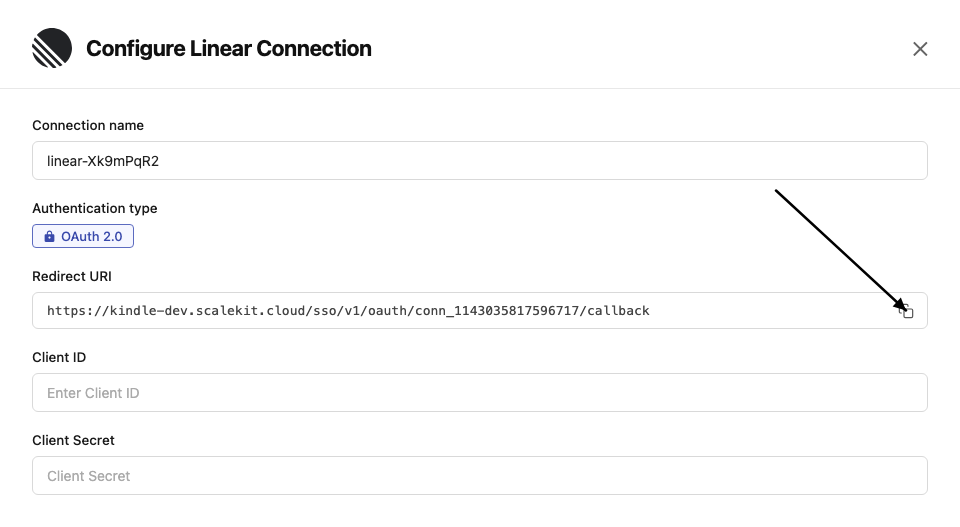
-
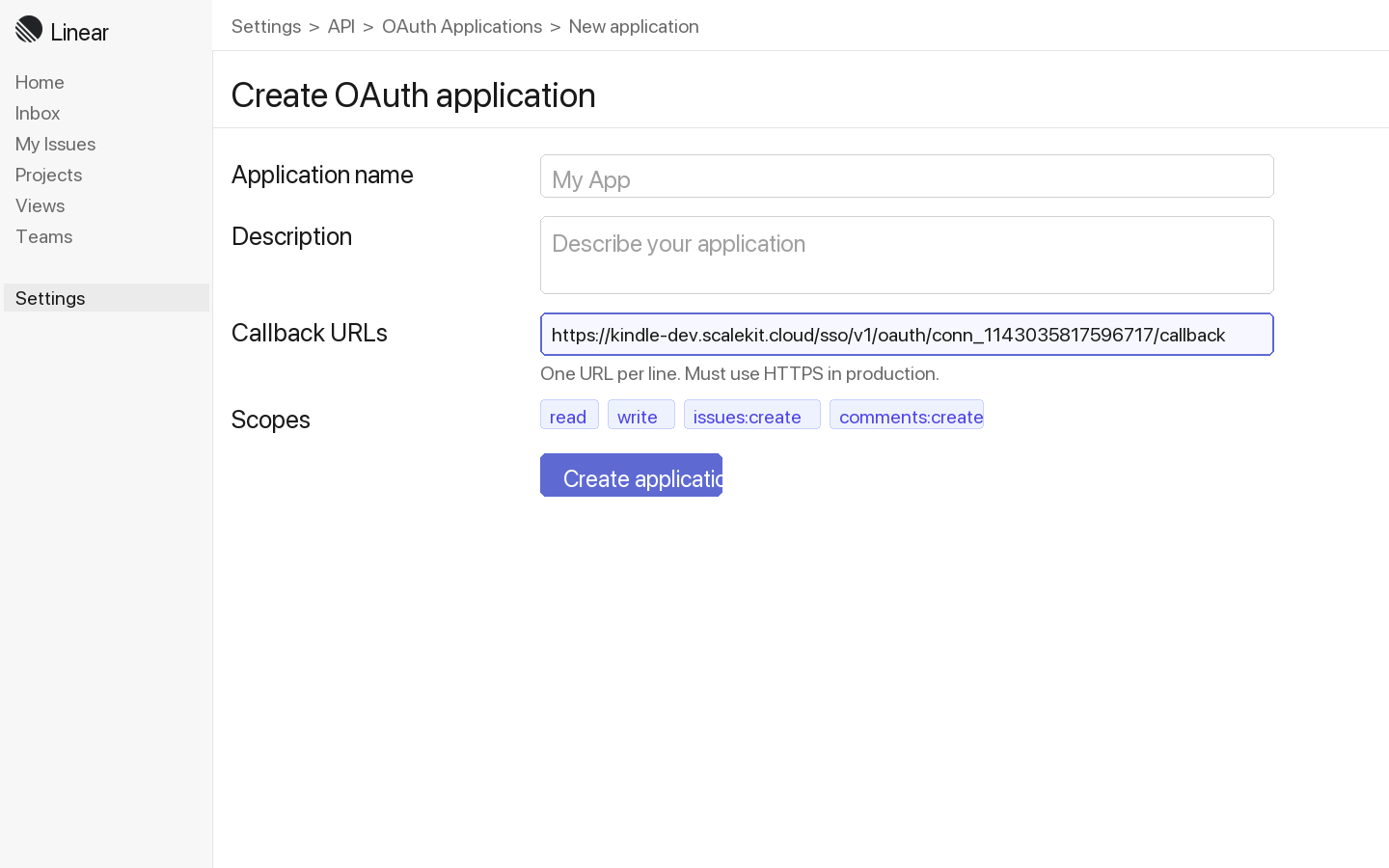
Log in to Linear and go to Settings → API → OAuth applications.
-
Click New application, enter an application name and description, then paste the redirect URI from Scalekit into the Callback URLs field. Click Create application.
-
-
Get client credentials
- In your Linear OAuth application, copy the Client ID and Client Secret.
-
Add credentials in Scalekit
-
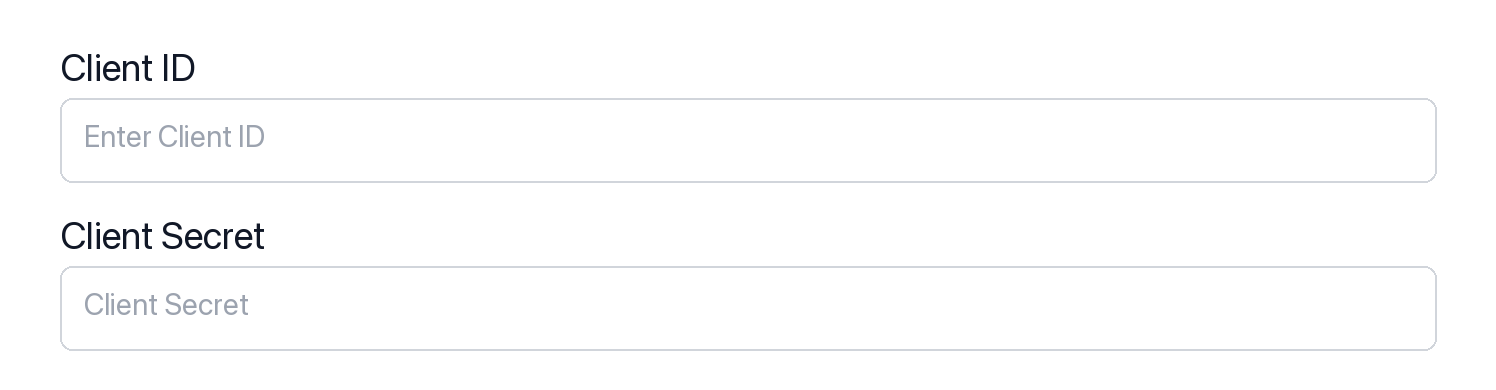
In Scalekit dashboard, go to AgentKit > Connections and open the connection you created.
-
Enter your credentials:
- Client ID (from above)
- Client Secret (from above)
- Permissions (scopes — see Linear OAuth scopes reference)
-
Click Save.
-
-
-
Authorize and make your first call
Section titled “Authorize and make your first call”quickstart.ts import { ScalekitClient } from '@scalekit-sdk/node'import 'dotenv/config'const scalekit = new ScalekitClient(process.env.SCALEKIT_ENV_URL,process.env.SCALEKIT_CLIENT_ID,process.env.SCALEKIT_CLIENT_SECRET,)const actions = scalekit.actionsconst connector = 'linear'const identifier = 'user_123'// Generate an authorization link for the userconst { link } = await actions.getAuthorizationLink({ connectionName: connector, identifier })console.log('Authorize Linear:', link)process.stdout.write('Press Enter after authorizing...')await new Promise(r => process.stdin.once('data', r))// Make your first callconst result = await actions.executeTool({connector,identifier,toolName: 'linear_issues_list',toolInput: {},})console.log(result)quickstart.py import osfrom scalekit.client import ScalekitClientfrom dotenv import load_dotenvload_dotenv()scalekit_client = ScalekitClient(env_url=os.getenv("SCALEKIT_ENV_URL"),client_id=os.getenv("SCALEKIT_CLIENT_ID"),client_secret=os.getenv("SCALEKIT_CLIENT_SECRET"),)actions = scalekit_client.actionsconnection_name = "linear"identifier = "user_123"# Generate an authorization link for the userlink_response = actions.get_authorization_link(connection_name=connection_name,identifier=identifier,)print("Authorize Linear:", link_response.link)input("Press Enter after authorizing...")# Make your first callresult = actions.execute_tool(tool_input={},tool_name="linear_issues_list",connection_name=connection_name,identifier=identifier,)print(result)
What you can do
Section titled “What you can do”Connect this agent connector to let your agent:
- Read issues — fetch issues, projects, cycles, and team details
- Create and update issues — file new issues, update status, set priority, and assign teammates
- Manage projects — create and update project metadata and milestones
- Search — find issues by keyword, assignee, label, or state
Common workflows
Section titled “Common workflows”Proxy API call
// Make a GraphQL request via Scalekit proxyconst result = await actions.request({ connectionName: 'linear', identifier: 'user_123', path: '/graphql', method: 'POST', body: JSON.stringify({ query: '{ viewer { id name email } }' }),});console.log(result);import json
# Make a GraphQL request via Scalekit proxyresult = actions.request( connection_name='linear', identifier='user_123', path="/graphql", method="POST", body=json.dumps({"query": "{ viewer { id name email } }"}))print(result)Execute a tool
const result = await actions.executeTool({ connector: 'linear', identifier: 'user_123', toolName: 'linear_graphql_query', toolInput: { query: '{ viewer { id name email } }', },});console.log(result);result = actions.execute_tool( connection_name='linear', identifier='user_123', tool_name='linear_graphql_query', tool_input={ "query": "{ viewer { id name email } }", },)print(result)Getting resource IDs
Section titled “Getting resource IDs”Most Linear tools require one or more IDs. Always fetch IDs from the API — never guess or hard-code them.
| Resource | Tool to get ID | Field in response |
|---|---|---|
| Team ID | linear_teams_list | teams.nodes[].id |
| Issue ID | linear_issues_list or linear_issue_search | issues.nodes[].id |
| Project ID | linear_projects_list | projects.nodes[].id |
| Cycle ID | linear_cycles_list | cycles.nodes[].id |
| Label ID | linear_labels_list | issueLabels.nodes[].id |
| Workflow State ID | linear_workflow_states_list | workflowStates.nodes[].id |
| User ID | linear_users_list | users.nodes[].id |
| Comment ID | linear_comments_list | comments.nodes[].id |
| Attachment ID | linear_issue_get (include attachments) | issue.attachments.nodes[].id |
| Webhook ID | linear_webhooks_list | webhooks.nodes[].id |
| Milestone ID | linear_project_milestones_list | projectMilestones.nodes[].id |
| Roadmap ID | linear_roadmaps_list | roadmaps.nodes[].id |
Tool list
Section titled “Tool list”Use the exact tool names from the Tool list below when you call execute_tool. If you’re not sure which name to use, list the tools available for the current user first.
linear_attachment_create#Create an external link attachment on a Linear issue.4 params
Create an external link attachment on a Linear issue.
issueIdstringrequiredID of the issue to attach the link totitlestringrequiredAttachment titleurlstringrequiredURL of the attachmentsubtitlestringoptionalSubtitle or description for the attachmentlinear_attachment_delete#Delete an attachment from a Linear issue.1 param
Delete an attachment from a Linear issue.
attachmentIdstringrequiredID of the attachment to deletelinear_attachment_update#Update the title or subtitle of an existing attachment on a Linear issue.3 params
Update the title or subtitle of an existing attachment on a Linear issue.
attachmentIdstringrequiredID of the attachment to updatetitlestringrequiredNew title for the attachmentsubtitlestringoptionalNew subtitle or descriptionlinear_comment_create#Create a comment on a Linear issue.2 params
Create a comment on a Linear issue.
bodystringrequiredComment textissueIdstringrequiredID of the issue to comment onlinear_comment_delete#Permanently delete a comment from a Linear issue.1 param
Permanently delete a comment from a Linear issue.
commentIdstringrequiredID of the comment to deletelinear_comment_get#Retrieve a single comment by its ID.1 param
Retrieve a single comment by its ID.
commentIdstringrequiredID of the comment to retrievelinear_comment_update#Update the text body of an existing Linear comment.2 params
Update the text body of an existing Linear comment.
bodystringrequiredUpdated comment textcommentIdstringrequiredID of the comment to updatelinear_comments_list#List all comments on a specific Linear issue with pagination support.3 params
List all comments on a specific Linear issue with pagination support.
issueIdstringrequiredID of the issue to list comments forafterstringoptionalPagination cursor for fetching the next pagefirstintegeroptionalNumber of comments to returnlinear_cycle_create#Create a new cycle (sprint) for a Linear team. Requires a team ID, start date, and end date.5 params
Create a new cycle (sprint) for a Linear team. Requires a team ID, start date, and end date.
endsAtstringrequiredCycle end date-time in ISO 8601 formatstartsAtstringrequiredCycle start date-time in ISO 8601 formatteamIdstringrequiredID of the team to create the cycle indescriptionstringoptionalOptional description of the cyclenamestringoptionalOptional custom name for the cyclelinear_cycle_get#Get a specific Linear cycle by ID, including its issues.1 param
Get a specific Linear cycle by ID, including its issues.
cycleIdstringrequiredID of the cycle to retrievelinear_cycle_issues_list#List all issues in a specific Linear cycle with pagination support.3 params
List all issues in a specific Linear cycle with pagination support.
cycleIdstringrequiredID of the cycle to list issues forafterstringoptionalPagination cursor for fetching the next pagefirstintegeroptionalNumber of issues to returnlinear_cycle_update#Update an existing cycle (sprint) in Linear.5 params
Update an existing cycle (sprint) in Linear.
cycleIdstringrequiredID of the cycle to updatedescriptionstringoptionalNew description for the cycleendsAtstringoptionalNew end date-time in ISO 8601 formatnamestringoptionalNew name for the cyclestartsAtstringoptionalNew start date-time in ISO 8601 formatlinear_cycles_list#List cycles (sprints) for a Linear team with pagination support.3 params
List cycles (sprints) for a Linear team with pagination support.
teamIdstringrequiredTeam ID to list cycles forafterstringoptionalPagination cursor for fetching the next pagefirstintegeroptionalNumber of cycles to returnlinear_graphql_query#Execute a custom GraphQL query or mutation against the Linear API. Allows running any valid GraphQL operation with variables support for advanced use cases.2 params
Execute a custom GraphQL query or mutation against the Linear API. Allows running any valid GraphQL operation with variables support for advanced use cases.
querystringrequiredThe GraphQL query or mutation to executevariablesobjectoptionalVariables to pass to the GraphQL querylinear_issue_archive#Archive a Linear issue by ID using the issueArchive mutation.1 param
Archive a Linear issue by ID using the issueArchive mutation.
issueIdstringrequiredID of the issue to archivelinear_issue_create#Create a new issue in Linear using the issueCreate mutation. Requires a team ID and title at minimum.9 params
Create a new issue in Linear using the issueCreate mutation. Requires a team ID and title at minimum.
teamIdstringrequiredID of the team to create the issue intitlestringrequiredTitle of the issueassigneeIdstringoptionalID of the user to assign the issue todescriptionstringoptionalDescription of the issueestimatestringoptionalStory point estimate for the issuelabelIdsarrayoptionalArray of label IDs to apply to the issueprioritystringoptionalPriority level of the issue (1-4, where 1 is urgent)projectIdstringoptionalID of the project to associate the issue withstateIdstringoptionalID of the workflow state to setlinear_issue_delete#Permanently delete a Linear issue by ID using the issueDelete mutation.1 param
Permanently delete a Linear issue by ID using the issueDelete mutation.
issueIdstringrequiredID of the issue to deletelinear_issue_get#Get a single Linear issue by ID, including its state, assignee, team, labels, and project details.1 param
Get a single Linear issue by ID, including its state, assignee, team, labels, and project details.
issueIdstringrequiredID of the issue to retrievelinear_issue_relation_create#Create a relation between two issues. Valid types: blocks, duplicate, related, similar.3 params
Create a relation between two issues. Valid types: blocks, duplicate, related, similar.
issueIdstringrequiredID of the issuerelatedIssueIdstringrequiredID of the related issuetypestringrequiredRelation type: blocks, duplicate, related, or similarlinear_issue_relation_delete#Delete an issue relation by its ID.1 param
Delete an issue relation by its ID.
relationIdstringrequiredID of the issue relation to deletelinear_issue_relations_list#List all relations for a specific issue (blocks, duplicates, related, similar).1 param
List all relations for a specific issue (blocks, duplicates, related, similar).
issueIdstringrequiredID of the issue to get relations forlinear_issue_search#Full-text search for issues across the workspace by query string.3 params
Full-text search for issues across the workspace by query string.
querystringrequiredText to search for across issue titles and descriptionsfirstintegeroptionalNumber of results to return (max 250)teamIdstringoptionalRestrict search to a specific team IDlinear_issue_unarchive#Restore an archived issue back to active status.1 param
Restore an archived issue back to active status.
issueIdstringrequiredID of the archived issue to restorelinear_issue_update#Update an existing issue in Linear. You can update title, description, priority, state, and assignee.6 params
Update an existing issue in Linear. You can update title, description, priority, state, and assignee.
issueIdstringrequiredID of the issue to updateassigneeIdstringoptionalID of the user to assign the issue todescriptionstringoptionalNew description for the issueprioritystringoptionalPriority level of the issue (1-4, where 1 is urgent)stateIdstringoptionalID of the workflow state to settitlestringoptionalNew title for the issuelinear_issues_list#List issues in Linear using the issues query with simple filtering and pagination support.8 params
List issues in Linear using the issues query with simple filtering and pagination support.
afterstringoptionalCursor for pagination (returns issues after this cursor)assigneestringoptionalFilter by assignee email (e.g., 'user@example.com')beforestringoptionalCursor for pagination (returns issues before this cursor)firstintegeroptionalNumber of issues to return (pagination)labelsarrayoptionalFilter by label names (array of strings)prioritystringoptionalFilter by priority level (1=Urgent, 2=High, 3=Medium, 4=Low)projectstringoptionalFilter by project name (e.g., 'Q4 Goals')statestringoptionalFilter by state name (e.g., 'In Progress', 'Done')linear_label_create#Create a new issue label in a Linear team.4 params
Create a new issue label in a Linear team.
namestringrequiredLabel nameteamIdstringrequiredTeam ID to create the label incolorstringoptionalLabel color as hex codedescriptionstringoptionalLabel descriptionlinear_labels_list#List issue labels in the Linear workspace, optionally filtered by team.2 params
List issue labels in the Linear workspace, optionally filtered by team.
firstintegeroptionalNumber of labels to returnteamIdstringoptionalFilter labels by team IDlinear_project_create#Create a new project in Linear with optional description, state, and date fields.6 params
Create a new project in Linear with optional description, state, and date fields.
namestringrequiredName of the projectteamIdsarrayrequiredArray of team IDs to associate with the projectdescriptionstringoptionalDescription of the projectstartDatestringoptionalStart date in YYYY-MM-DD formatstatestringoptionalProject state: planned, started, paused, completed, cancelledtargetDatestringoptionalTarget date in YYYY-MM-DD formatlinear_project_get#Get a single Linear project by ID, including teams, members, and associated issues.1 param
Get a single Linear project by ID, including teams, members, and associated issues.
projectIdstringrequiredID of the project to retrievelinear_project_milestone_create#Create a new milestone for a project.4 params
Create a new milestone for a project.
namestringrequiredName of the milestoneprojectIdstringrequiredID of the project to add the milestone todescriptionstringoptionalDescription of the milestonetargetDatestringoptionalTarget completion date (YYYY-MM-DD)linear_project_milestone_delete#Delete a project milestone by its ID.1 param
Delete a project milestone by its ID.
milestoneIdstringrequiredID of the milestone to deletelinear_project_milestone_update#Update an existing project milestone.4 params
Update an existing project milestone.
milestoneIdstringrequiredID of the milestone to updatedescriptionstringoptionalNew descriptionnamestringoptionalNew name for the milestonetargetDatestringoptionalNew target date (YYYY-MM-DD)linear_project_milestones_list#List milestones for a specific project.2 params
List milestones for a specific project.
projectIdstringrequiredID of the project to list milestones forfirstintegeroptionalNumber of milestones to returnlinear_project_update#Update an existing Linear project's name, description, state, or dates.6 params
Update an existing Linear project's name, description, state, or dates.
projectIdstringrequiredID of the project to updatedescriptionstringoptionalUpdated description of the projectnamestringoptionalUpdated name of the projectstartDatestringoptionalUpdated start date in YYYY-MM-DD formatstatestringoptionalUpdated project state: planned, started, paused, completed, cancelledtargetDatestringoptionalUpdated target date in YYYY-MM-DD formatlinear_projects_list#List all projects in the Linear workspace with pagination support.2 params
List all projects in the Linear workspace with pagination support.
afterstringoptionalPagination cursor for fetching the next pagefirstintegeroptionalNumber of projects to returnlinear_roadmaps_list#List all roadmaps in the Linear workspace with pagination support.2 params
List all roadmaps in the Linear workspace with pagination support.
afterstringoptionalPagination cursor for fetching the next pagefirstintegeroptionalNumber of roadmaps to returnlinear_team_create#Create a new team in the Linear workspace.5 params
Create a new team in the Linear workspace.
namestringrequiredName of the teamcolorstringoptionalTeam color as hex codedescriptionstringoptionalDescription of the teamkeystringoptionalShort identifier key for the team (e.g. PLAT)privatebooleanoptionalWhether the team is privatelinear_team_get#Get a single Linear team by ID, including its members and workflow states.1 param
Get a single Linear team by ID, including its members and workflow states.
teamIdstringrequiredID of the team to retrievelinear_team_update#Update an existing team's name, description, or settings.4 params
Update an existing team's name, description, or settings.
teamIdstringrequiredID of the team to updatecolorstringoptionalNew team color as hex codedescriptionstringoptionalNew description for the teamnamestringoptionalNew name for the teamlinear_teams_list#List all teams in the Linear workspace with their members and pagination support.2 params
List all teams in the Linear workspace with their members and pagination support.
afterstringoptionalPagination cursor for fetching the next pagefirstintegeroptionalNumber of teams to returnlinear_test_list#List issues in Linear using the issues query with simple filtering and pagination support.8 params
List issues in Linear using the issues query with simple filtering and pagination support.
afterstringoptionalCursor for pagination (returns issues after this cursor)assigneestringoptionalFilter by assignee email (e.g., 'user@example.com')beforestringoptionalCursor for pagination (returns issues before this cursor)firstintegeroptionalNumber of issues to return (pagination)labelsarrayoptionalFilter by label names (array of strings)prioritystringoptionalFilter by priority level (1=Urgent, 2=High, 3=Medium, 4=Low)projectstringoptionalFilter by project name (e.g., 'Q4 Goals')statestringoptionalFilter by state name (e.g., 'In Progress', 'Done')linear_user_get#Retrieve a single Linear user by their ID.1 param
Retrieve a single Linear user by their ID.
userIdstringrequiredID of the user to retrievelinear_users_list#List all users in the Linear workspace with pagination support.2 params
List all users in the Linear workspace with pagination support.
afterstringoptionalPagination cursor for fetching the next pagefirstintegeroptionalNumber of users to returnlinear_viewer_get#Get the currently authenticated Linear user (viewer), including their teams.0 params
Get the currently authenticated Linear user (viewer), including their teams.
linear_webhook_create#Create a new webhook for Linear events. Specify the URL and the resource types to subscribe to.6 params
Create a new webhook for Linear events. Specify the URL and the resource types to subscribe to.
resourceTypesarrayrequiredList of resource types to subscribe to (e.g. Issue, Comment, Project)urlstringrequiredThe URL to receive webhook payloadsenabledbooleanoptionalWhether the webhook is active (default: true)labelstringoptionalHuman-readable label for the webhooksecretstringoptionalSecret token to sign the webhook payloadteamIdstringoptionalRestrict webhook to a specific team IDlinear_webhook_delete#Delete a webhook by its ID.1 param
Delete a webhook by its ID.
webhookIdstringrequiredID of the webhook to deletelinear_webhook_get#Retrieve a single webhook by its ID.1 param
Retrieve a single webhook by its ID.
webhookIdstringrequiredID of the webhooklinear_webhook_update#Update an existing webhook's URL, resource types, label, or enabled status.6 params
Update an existing webhook's URL, resource types, label, or enabled status.
webhookIdstringrequiredID of the webhook to updateenabledbooleanoptionalEnable or disable the webhooklabelstringoptionalNew label for the webhookresourceTypesarrayoptionalUpdated list of resource types to subscribe tosecretstringoptionalNew secret token for signing payloadsurlstringoptionalNew URL to receive webhook payloadslinear_webhooks_list#List all webhooks configured for the current workspace.2 params
List all webhooks configured for the current workspace.
afterstringoptionalPagination cursorfirstintegeroptionalNumber of webhooks to returnlinear_workflow_state_create#Create a new workflow state for a Linear team. Valid types: backlog, unstarted, started, completed, canceled.6 params
Create a new workflow state for a Linear team. Valid types: backlog, unstarted, started, completed, canceled.
colorstringrequiredColor of the state as a hex codenamestringrequiredName of the workflow stateteamIdstringrequiredID of the team to create the state intypestringrequiredState type: backlog, unstarted, started, completed, or canceleddescriptionstringoptionalOptional description of the statepositionnumberoptionalPosition of the state in the workflowlinear_workflow_state_get#Retrieve a single workflow state by its ID.1 param
Retrieve a single workflow state by its ID.
stateIdstringrequiredID of the workflow statelinear_workflow_state_update#Update an existing workflow state in Linear.4 params
Update an existing workflow state in Linear.
stateIdstringrequiredID of the workflow state to updatecolorstringoptionalNew color as hex codedescriptionstringoptionalNew description for the statenamestringoptionalNew name for the statelinear_workflow_states_list#List workflow states in the Linear workspace, optionally filtered by team.2 params
List workflow states in the Linear workspace, optionally filtered by team.
firstintegeroptionalNumber of workflow states to returnteamIdstringoptionalFilter by team ID